Cogsprout
Free · No sign-up · Progress saves on this device
Cogsprout
About the game
Program a little gardening robot with command tiles: 25 plots, a Daily Plot and fewest-tile blossoms.
How to play
Sprout, Bloom or Thorn: change the level on the Garden Path. The Daily Plot sets its own.
About the game
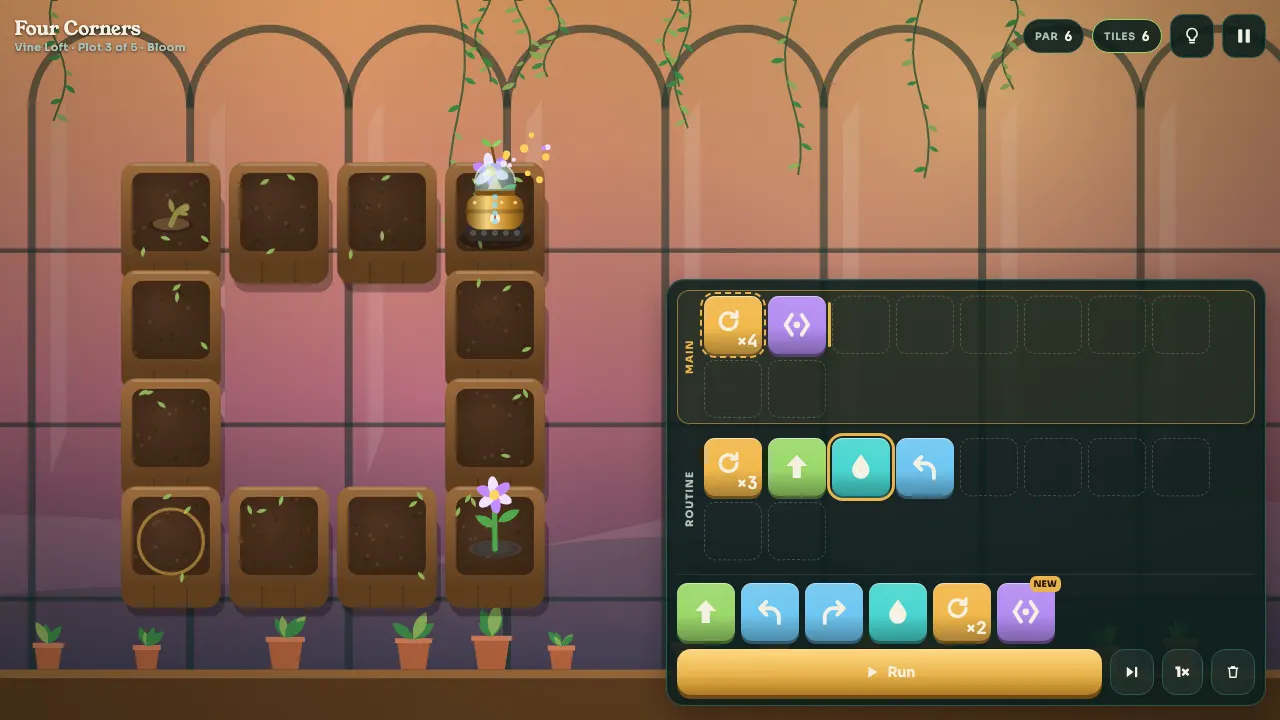
Tock is a little brass robot who looks after a greenhouse in the sky, but he only does exactly what you tell him. Lay command tiles in his program, press Run and watch him step, turn and water. Every dry sprout must bloom.
The fewer tiles you use, the more blossoms you win: match par for three. Each garden brings a new tile: Repeat for long walks, a Routine lane to reuse a pattern, If tiles that check for a sprout or a wall, and a Routine that runs itself until the work is done. The first steps of real coding, made into a calm puzzle.
Grow a pot in your Greenhouse for every plot, open new paint and hats for Tock in his Shed, and try the Daily Plot: a new plot every day, the same for everyone, where a clever Routine can beat par.
How to play
On a phone: tap a tile to add it, drag tiles to move them, tap a tile in your program to remove it or change a Repeat, then press Run. Plays upright or sideways.
Cogsprout guide
Step by step
- Meet Tock, a little brass robot who tends a greenhouse in the sky. He only does exactly what you tell him.
- Lay command tiles in his program: Step, Turn and Water. On a phone, tap a tile to add it at the gold cursor and drag tiles to move them. On a keyboard, the up arrow or F adds Step, the side arrows add turns and W or Space adds Water.
- Press Run, or Enter, and watch Tock follow the tiles one by one.
- Water every dry sprout to finish the plot. Then try again with fewer tiles for more blossoms.
Tips
- Count squares before you lay tiles. Watering bare soil stops the run, but bumping into a stone does not.
- Use the one-step key, N, to walk through your program slowly and see exactly where it goes wrong.
- Repeat does the next tile again and again. Tap a Repeat in your lane, or press a number key, to set it from 2 to 9.
- When the same pattern shows up twice, put it in the Routine lane and call it with one Routine tile. Tab switches lanes on a keyboard.
- If tiles only act when something is true: If on a dry sprout waters only where needed, and If blocked ahead turns at walls.
- Put the Routine tile at the end of the Routine lane and Tock goes round and round, stopping by himself when every sprout is watered.
Levels and modes
Cogsprout has 25 plots in five gardens, and each garden brings a new tile: Seedling Shelf (Step, Turn, Water), Trellis Walk (Repeat), Vine Loft (a Routine lane), Rain Gutter (If tiles) and Moon Orchard (a Routine that runs itself). Plots open one after another. Match par to win three blossoms.
Sprout, Bloom and Thorn change how strict par is; Sprout can also show a glowing trail of a good route, and on Thorn the lanes only hold a few tiles more than par. Each plot grows a pot in your Greenhouse, blossoms open paints and hats for Tock in his Shed, and the Daily Plot is a new coding puzzle every day where a clever Routine can beat par.
Questions
How do I get three blossoms in Cogsprout?
Water every sprout using no more tiles than par. Look for repeated patterns and fold them into a Repeat or a Routine.
What is a Routine?
A second lane of tiles you can run with a single Routine tile. It is like a function in real coding, so a pattern you use often only needs writing once.
Does Cogsprout teach real coding?
It teaches the first ideas of coding in a calm puzzle: order of steps, loops with Repeat, functions with Routines and conditions with If tiles.
Is there a daily puzzle?
Yes. The Daily Plot is a new plot every day, the same for everyone.
Is Cogsprout free?
Yes. Cogsprout is free to play on Playmoxi, with no download and no sign-up. Press Play and it starts in your browser.
Can I play Cogsprout on my phone?
Yes. Cogsprout works on phones, tablets and computers, with touch, keyboard or mouse. On a phone it plays upright or sideways, full screen.
Does Cogsprout save my progress?
Yes, on this device. Your progress is kept by your browser, so you can come back to it later. Once you have played, the game also opens offline.